




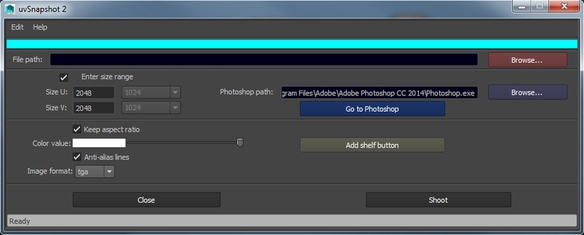


uvSnapshot 2
Script File AMRuvSnapshot.mel
Description:
-create uvSnapshot very easy.
-rename in conformity with the scene
-uvSnapshot save in scene directory
-uvSnapshot it's send to your Photoshop open document
(if photoshop is not open, it will open and create two layers "base" and "uv")
-save and remember settings
Install:
Copy AMRuvSnapshot.mel into /User/Documents/maya/version/scripts
Ex: C:\Users\<YourUserName>\Documents\maya\2015-x64\scripts
Copy AMRuvSnapshot.png into /User/Documents/maya/version/prefs/icons
Ex: C:\Users\<YourUserName>\Documents\maya\2015-x64\prefs\icons
Open /User/Documents/maya/version/scripts/userSetup.mel (If doesn't exists, then create it.
Creating a user setup file is pretty easy, it's a regular text file
named "userSetup" with the "txt" extension changed to "mel").
Open the “userSetup.mel” file with Notepad.exe and inserts this line: source AMRuvSnapshot;
Now launch Maya and insert: AMRuvSnapshot; in Command Line.
That's it! enjoy
Please use the Bug System to report any bugs.
Please use the Feature Requests to give me ideas.
Please use the Support Forum if you have any questions or problems.
Please rate and review in the Review section.
Please use the Feature Requests to give me ideas.
Please use the Support Forum if you have any questions or problems.
Please rate and review in the Review section.


